Kindle Page Turners, Explained
"Kindle page turner" covers very different things: a clip that taps your screen, a jailbreak setup, or a Bluetooth remote the Kindle treats as its own. Here's how each one works and which one fits your Kindle.
We sell Kindle page turners. We've tried to be fair to the options we don't sell, too.
Why a remote?
- Lying down. Hold the Kindle on a pillow or stand and keep one hand under the covers.
- Hands busy. Eating, knitting, holding a baby, on a bike or treadmill.
- Comfort and access. Arthritis, tremors, limited reach, or just a long reading session where tapping gets tiring.
- Clean screen. No smudges, no reaching across the page.
A short history
2016–2025: Bluetooth, but only for sound. Kindles got Bluetooth in 2016 for VoiceView (the screen reader) and later for Audible. It only carried audio. Pair a Bluetooth keyboard or clicker and the Kindle would ignore it.
The clip-on era. Since the Kindle wouldn't listen to a remote, people built remotes that didn't need it to. A clip-on "tapper" sits on the edge of the screen and taps it for you when you press a button. They've been around for years, and BookTok made them a staple of "Kindle setup" videos.
The jailbreak route. Enthusiasts jailbroke their Kindles, installed the open-source reader KOReader, and wrote bridges that let ordinary Bluetooth controllers turn pages. It works, but it takes real effort, and every Kindle update can close the door.
October 2026: the Kindle Click. Amazon announced its own Bluetooth remote, the Kindle Click ($34.99), for Kindles released in 2024 or later. Support arrived in Kindle software 5.20.1.
Days later: remotes that speak Click. Developers worked out how the Kindle recognizes its remote and published open-source firmware that makes other hardware look like a Kindle Click. Commercial remotes followed. That's where third-party Bluetooth page turners for Kindle come from, and why they need no jailbreak.
How it works
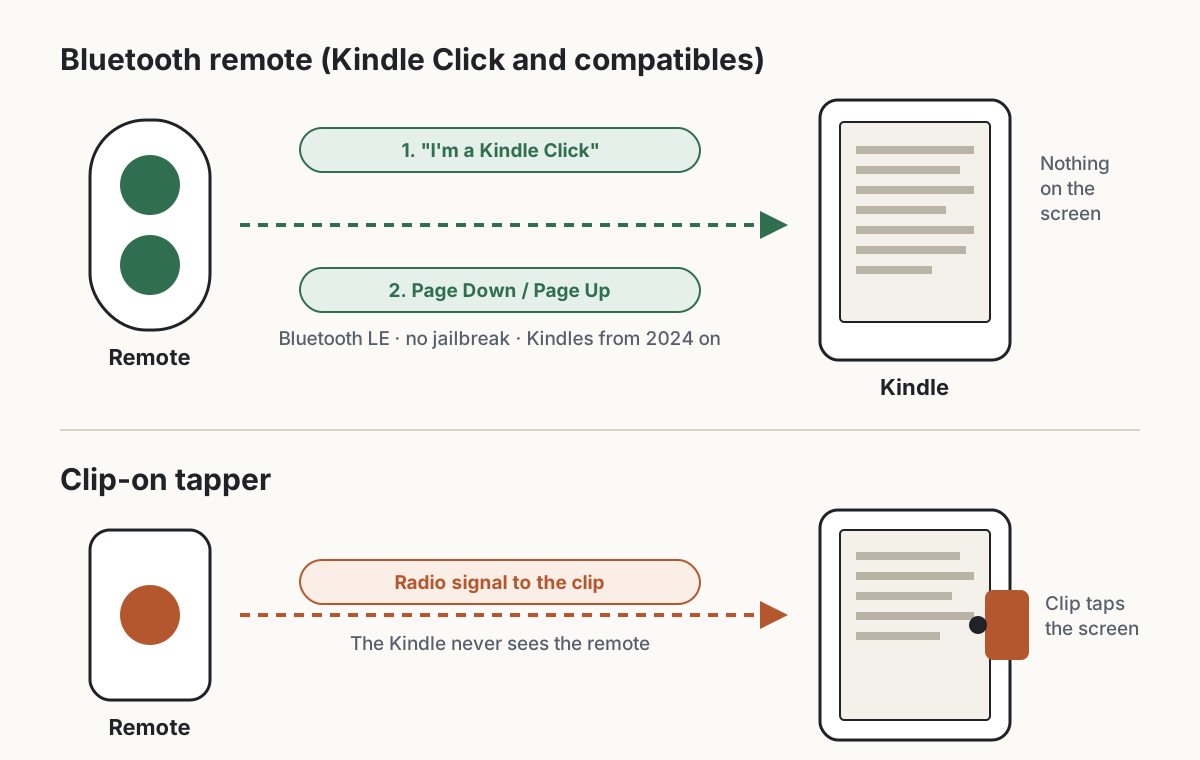
Bluetooth remotes (Kindle Click and compatibles)
The Kindle Click is a Bluetooth Low Energy remote that behaves like a tiny keyboard. The key detail is how the Kindle decides which remotes to accept: it checks the remote's identity, Amazon's company ID plus the Kindle Click product ID, which the remote announces when it advertises and again when it connects.
A remote that announces that identity is treated as a Kindle Click. One that doesn't, like a generic Bluetooth clicker, foot pedal or "TikTok ring", is ignored. That's why a $5 camera shutter won't turn your Kindle's pages, while a Click-compatible remote will.
Once connected, the Kindle listens for just five keys:
| Button | What the Kindle sees |
|---|---|
| Next page | Page Down |
| Previous page | Page Up |
| Brighter / dimmer | Brightness up / down |
| Sleep | Power |
Everything else is dropped. A few limits come from the Kindle itself, so they apply to every remote, Amazon's included:
- It can put the Kindle to sleep, but not wake it. Press the Kindle's power button; the remote reconnects within a few seconds.
- Holding a page button turns one page, not a stream of them.
- Keep your Kindle updated. On 5.20.1 and earlier, remote page turns don't count as activity, so the Kindle can fall asleep mid-chapter. Update 5.20.1.0.2 fixes it.
Remotes with a mode switch (like our Keycap and Ergo) simply change identity: in Kindle mode they present as a Kindle Click; in Android mode they act as volume keys, which many reading apps use to turn pages.
Clip-on tappers
A clip-on tapper doesn't talk to the Kindle at all. The clip holds a conductive pad against the screen; your remote signals the clip (usually over radio, not Bluetooth), and the pad registers a tap at that spot. To the Kindle it's just a finger.
That's why clip-ons work on almost any touchscreen Kindle, old or new. It's also where their trade-offs come from: one clip taps one spot, so going back a page usually needs a second clip; the clip sits on the screen and can cover text near the edge; and it has to fit around your case.
Jailbreak + KOReader
Jailbreaking lets you run your own software on the Kindle. With KOReader and a Bluetooth bridge, almost any controller can turn pages and trigger other actions. It's the most flexible option, and the most fragile: you need firmware a jailbreak supports, you have to block updates, setup involves SSH and config files, and there's a real risk of bricking the device.
Build your own
If you like to tinker, you can build a Click-compatible remote from a few dollars of parts. The protocol is documented, and several open-source projects already do it:
| Project | Runs on |
|---|---|
| Open-Kindle-Click | Seeed XIAO nRF52840 (also ESP32-C6, Flipper Zero, and an Android app) |
| nes-dpad-kindle-remote | XIAO nRF52840 in an NES D-pad keychain |
| KindlePageturner | XIAO ESP32-S3 with a membrane keypad |
| kindle-curie | ESP32-S3 / ESP32-C3 |
| NOTE4 Kindle Page Turner | ZECTRIX NOTE4 (ESP32-S3 with an e-paper screen), our own project |
The recipe in short: a Bluetooth LE board, a few buttons, a small battery, and firmware that advertises the Kindle Click identity and sends those five keys. Our NOTE4 project's protocol guide walks through it byte by byte.
What's hard isn't the protocol, it's the battery. An ESP32 stays connected at a few to tens of milliamps, which drains a small cell in days; nRF52840 boards idle at microamps, which is why most long-lasting builds use them. Then there's the enclosure, usually 3D-printed. Expect $10–20 in parts and a weekend. Fun, but not cheaper than buying one.
Your options
| Kindle Click | Click-compatible remotes | Clip-on tapper | Jailbreak + KOReader | |
|---|---|---|---|---|
| Price | $34.99 | about $10–20 | about $15–30 | free + a controller |
| Kindles | 2024 and later | 2024+, Scribe (2022) | most touchscreen Kindles, incl. older ones | jailbreakable firmware only |
| Jailbreak | No | No | No | Yes |
| Anything on the screen | No | No | Yes | No |
| Thick cases | Any | Any | Often not | Any |
| Back a page | Yes | Yes | Usually needs a second clip | Yes |
| Brightness | Yes | Some models | No | Depends |
Kindle Click. Amazon's own remote: two large page buttons, brightness on the side, both together to sleep, USB-C, "weeks" per charge. It's the default choice if you want first-party, though it's $34.99.
Click-compatible remotes. Third-party remotes that use the same protocol, so they pair the same way and need no jailbreak. They're cheaper and come in more shapes and colors; some add Android or other e-reader modes. Examples include the Zhilian Zongwei (智联纵维) remotes we sell, and Hanlinyue (翰林阅), whose remotes support Kindle after a firmware update through their app. Generic Bluetooth clickers are not in this group; check that a remote says it works with Kindle.
Clip-on tappers. The only no-jailbreak option for most Kindles from before 2024. Expect to see the clip on your screen and to fiddle with placement and cases.
Jailbreak + KOReader. For people who already run KOReader or want to customize everything. Not for most readers.
Which should you pick?
- Kindle from 2024 or later: a Bluetooth remote, either the Kindle Click or a Click-compatible one. Nothing on the screen, any case, no jailbreak.
- Older Kindle: a clip-on tapper. Bluetooth remotes won't work on it, even after updates.
- Already jailbroken, or you love tinkering: KOReader with a controller, or build your own.
If you're on a 2024-or-later Kindle and want something cheaper or more colorful than Amazon's, our page turners start at $10.
FAQ
Do I need to jailbreak my Kindle?
No, not for the Kindle Click or Click-compatible remotes on a Kindle from 2024 or later. Only the KOReader route needs a jailbreak.
Will any Bluetooth remote work?
No. The Kindle accepts only remotes that identify as a Kindle Click. Generic clickers, rings and foot pedals are ignored.
Does it work with older Kindles?
Bluetooth remotes don't. Kindles released before 2024 don't support them, even with the latest update. Use a clip-on tapper instead.
Can the remote wake my Kindle?
No. That's a Kindle limitation and applies to Amazon's remote too. Press the power button; the remote reconnects in a few seconds.
Why does my Kindle fall asleep while I'm turning pages?
On software 5.20.1 and earlier, remote page turns don't reset the sleep timer. Update your Kindle (5.20.1.0.2 or later), or set a longer sleep timeout.
Does it work with a thick case?
Bluetooth remotes do, since nothing touches the screen. Clip-ons can struggle with thick or raised-edge cases.
Kindle is a trademark of Amazon.com, Inc. HQB Market isn't affiliated with Amazon.